Your calendar beside your work, so you stay present.
See your day, find free time, and join your next meeting.
Chrome Web Store release in preparation. Newsletter signup is optional and separate from connecting Google Calendar.
Free calendar tools. Your Google accounts. Your choice of AI model.
Read the privacy policyKnow what comes next.
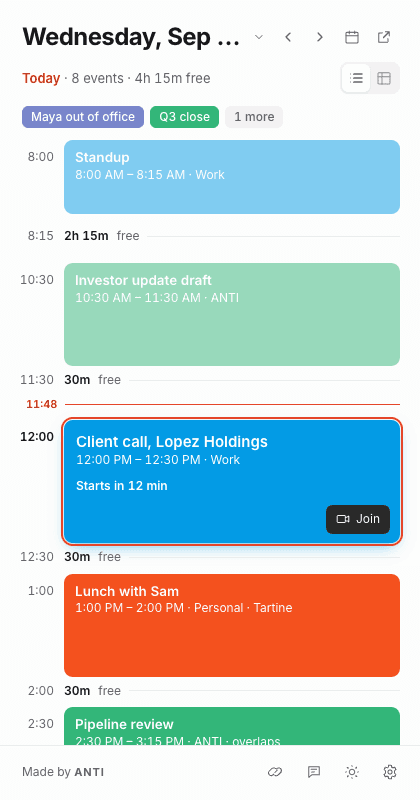
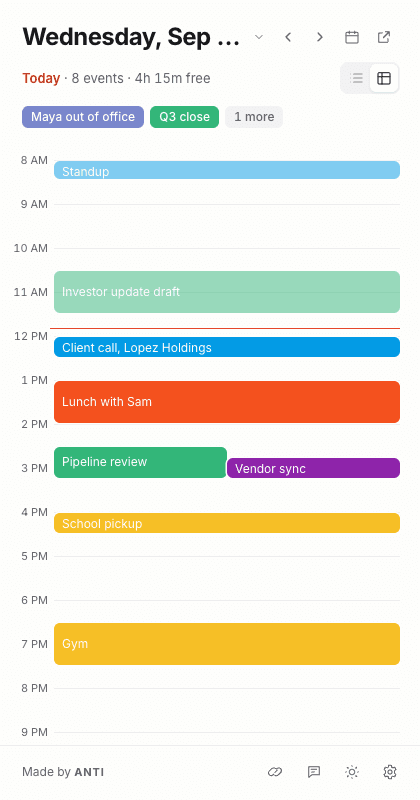
You can switch between an agenda stack and a full-day time grid. Free intervals show when they begin. Past events fade as your day moves forward.
Open the right link.
You can join a meeting directly, open an event in Google Calendar, or keep named booking links ready to share. Preferences and saved links can travel with Chrome Sync.
Choose your assistant.
You can bring an OpenRouter API key, select a model, and choose which calendars it may read. Ask about a date, search for an event, or find a gap. Calendar context goes directly to OpenRouter and the selected provider when you enable sharing and send a question.
Scheduling starts with a proposal. You review and accept before a personal event is created on a calendar you own. Invitations, recurring events, edits, and deletions are not supported.
AI is optional. OpenRouter usage is billed to your account, and compatible model availability varies. Check answers against your calendar.
Connect only what you need.
You do not need an ANTI account to use the extension. Calendar data stays in your Chrome profile and goes directly to Google, plus OpenRouter when you choose the assistant. ANTI Day has no advertising or analytics.
Read data and deletion detailsChrome and Google Calendar.
You need desktop Chrome 116 or later and a Google account with calendars you can access. AI features also require your own OpenRouter key. Google Workspace administrators may restrict third-party access.
See setup and troubleshooting